Case Study
Building the Lichfield Heritage Tour App: From GPS Tracking to 3D Gaussian Splats
How I built a full-featured progressive web app for heritage tours, combining real-time GPS tracking, location-triggered 3D content, audio narration, and a complete admin system.
19 January 2026•14 min read•By Thomas Hughes
## The Challenge: Building a Complete Heritage Tour Platform
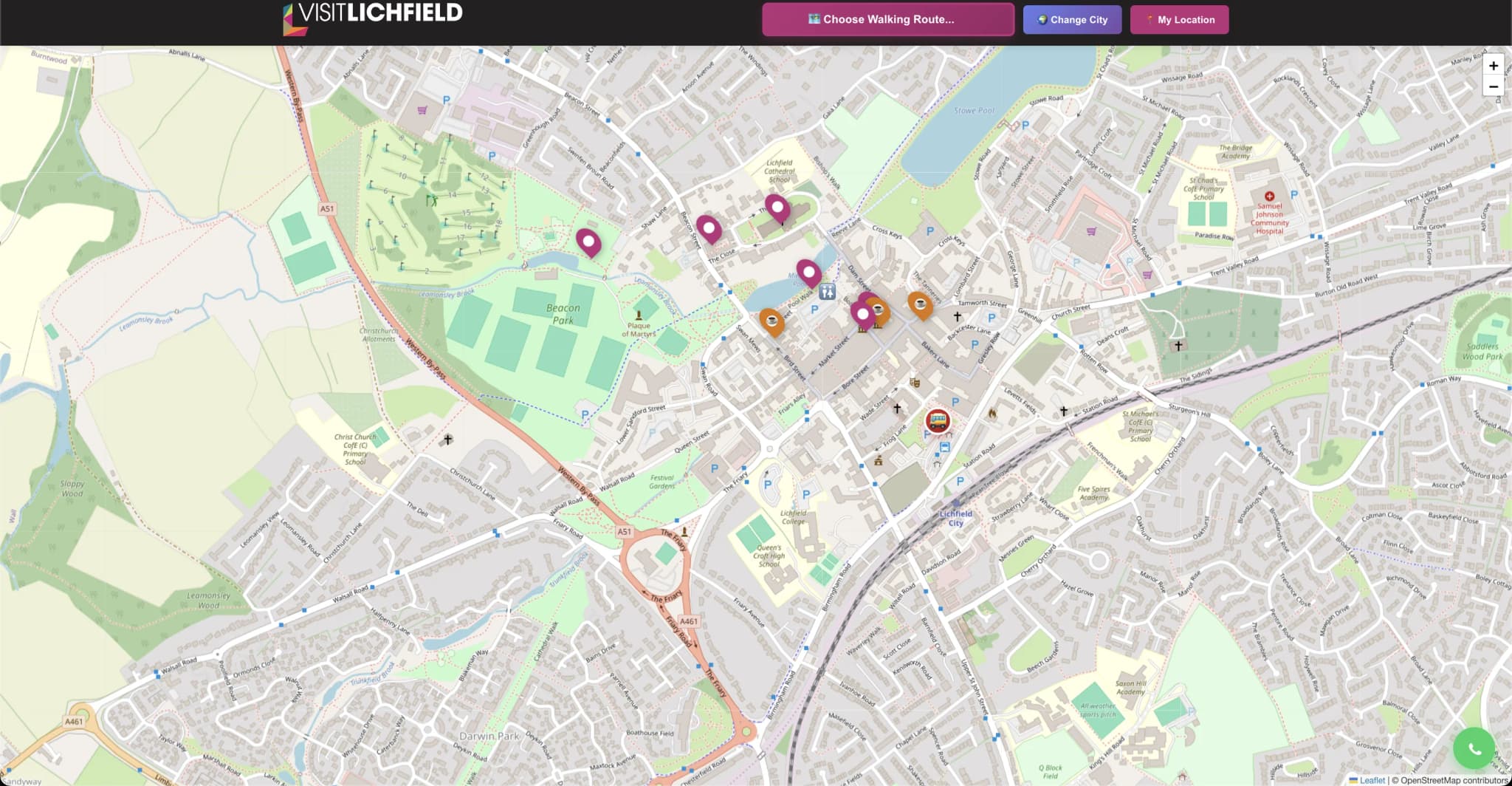
When I set out to create the Lichfield Heritage Tour App, I wasn't just building a virtual tour—I was building a complete platform that could transform how people experience historic cities. The vision was ambitious: an app that tracks your location in real-time as you walk through Lichfield's streets, automatically triggering 3D visualizations of landmarks, playing audio narration about each site, and providing an intuitive way for tour operators to create and manage tours.
This wasn't going to be a simple portfolio project. It required solving complex technical challenges across multiple domains: mobile GPS tracking, 3D content integration, audio playback, backend infrastructure, database architecture, and user experience design—all while ensuring the app worked reliably on any mobile device.
### What Makes This Project Different
Most virtual tours are static websites where users click through panoramas. The Lichfield Tour App is fundamentally different: it's a **progressive web application** that works like a native app, tracking your actual movement through the city and responding dynamically to your location. When you approach Lichfield Cathedral, the app knows you're there and automatically shows you a 3D Gaussian splat of the building while playing audio narration about its 900-year history.
The app includes three distinct interfaces:
1. **The Visitor App** - Mobile-optimized tour experience with GPS tracking and 3D content
2. **The Driver Portal** - For tour operators to launch tours and track participants
3. **The Admin Dashboard** - Complete tour management system for creating routes and managing content
## Technical Architecture: Building from the Ground Up
### The Frontend: Progressive Web App
I built the app as a PWA for several strategic reasons:
- **No app store friction** - Users can install it directly from the browser
- **Cross-platform compatibility** - Works on iPhone, Android, and any device with a modern browser
- **Offline capabilities** - Service workers cache essential content for unreliable mobile connections
- **Native-like experience** - Full-screen mode, home screen icon, works like a downloaded app
The frontend uses **vanilla JavaScript** rather than a framework. This might seem old-fashioned, but it was a deliberate choice: maximum compatibility, zero build process overhead, and complete control over performance optimization for mobile devices with varying capabilities.
### GPS Tracking: The Core Challenge
The GPS tracking system is the heart of the app. It needed to:
- Track users' location continuously as they walk (updating every few seconds)
- Trigger content when they reach specific landmarks (within 20-30 meter accuracy)
- Remain battery-efficient for 2+ hour walking tours
- Work reliably across different devices and GPS signal conditions
- Handle edge cases like GPS drift, signal loss, and tunnel sections
I implemented this using the **Geolocation API** with watchPosition for continuous tracking. The challenge was tuning the accuracy requirements and update frequency—too frequent and you drain the battery, too infrequent and you miss location triggers. After extensive testing on real walking tours through Lichfield, I settled on high-accuracy mode with automatic trigger zones around each landmark.
### 3D Integration: Gaussian Splats on Mobile
Integrating photorealistic 3D Gaussian splats into a mobile web app presented unique challenges. These are large files (5-10MB each) that need to render smoothly even on older phones with limited GPU capabilities.
I used **LumaAI's SDK** which provides optimized rendering for Gaussian splats. The integration required:
- **Lazy loading** - 3D models only load when you approach a landmark
- **Loading states** - Clear feedback while models download over mobile networks
- **Error handling** - Graceful degradation if 3D fails to load
- **Performance monitoring** - Ensuring smooth rendering doesn't impact GPS tracking or audio playback
The 3D models are hosted separately and loaded on-demand. When you're 50 meters from Lichfield Cathedral, the app begins preloading the 3D model. By the time you reach the trigger point, it's ready to display instantly.
### Audio System: Background Playback
The audio narration system needed to work seamlessly as users walk between locations. This meant solving several technical challenges:
- **Background playback** - Audio continues when screen locks or user switches apps
- **Location-triggered playback** - Audio starts automatically when reaching landmarks
- **Playlist management** - Multiple audio tracks across 15+ tour locations
- **Network optimization** - Progressive loading for longer narrations
I built a custom audio player using the **Web Audio API** with careful state management to handle the complex interaction between GPS position, audio playback state, and UI updates.
## The Backend: Tour Management Infrastructure
While the visitor-facing app gets the attention, the backend infrastructure is equally sophisticated. I built a complete **PHP/MySQL** system handling:
### Database Architecture
The MySQL database manages multiple interconnected data types:
- **Users** - Authentication, profiles, tour participation history
- **Cities** - Multi-city support allowing the platform to scale beyond Lichfield
- **Tours** - Active and archived tour sessions with real-time status
- **Locations** - GPS coordinates, 3D models, audio files, and metadata for each landmark
- **Check-ins** - Real-time tracking of which users have visited which locations
- **Drivers** - Tour operator accounts with permissions and analytics
The database design supports multi-city deployment—the same platform could be used for heritage tours in York, Bath, or Edinburgh simply by adding new city data and location records.
### Admin Dashboard
The admin dashboard provides comprehensive tour management capabilities:
- **Create tours** - Define routes, add locations, upload 3D models and audio
- **Manage drivers** - Tour operator accounts with different permission levels
- **Real-time monitoring** - See active tours and participant locations on a live map
- **Analytics** - Tour completion rates, popular locations, user engagement metrics
- **Content management** - Update location information, swap 3D models, edit audio narration
This isn't a backend-for-developers—it's a complete CMS designed for heritage site managers and tour operators who need to create and update tours without technical knowledge.
### API Architecture
The frontend communicates with the backend through a RESTful API I built in PHP. Key endpoints include:
- **/api/join.php** - User joins a tour (assigns them to active tour session)
- **/api/track-location.php** - Real-time GPS position updates
- **/api/record-location-visit.php** - Logs when user reaches a landmark
- **/api/tours.php** - Retrieves tour data and location information
- **/api/active-tours.php** - Lists currently running tours for driver portal
- **/api/create-tour.php** - Admin endpoint for tour creation
Each endpoint includes authentication checks, input validation, and error handling. The API returns JSON responses optimized for mobile bandwidth constraints.
## Development Process: From Concept to Deployment
### Phase 1: Core GPS Functionality
I started with the most critical feature: reliable GPS tracking. The first working prototype was deliberately simple—just a map showing your location and a list of landmarks with distance calculations. This allowed me to test GPS accuracy and battery consumption in real-world conditions.
I walked the actual Lichfield tour route dozens of times during development, testing different GPS update frequencies, trigger distances, and accuracy thresholds. This real-world testing was essential—GPS behavior varies dramatically between devices and environments (open streets vs. narrow lanes vs. buildings).
### Phase 2: 3D Content Integration
Once GPS tracking was solid, I integrated the Gaussian splat viewer. The challenge was making 3D content feel like a natural part of the walking experience rather than an afterthought. The solution was **location-triggered popups**—when you reach a landmark, a modal smoothly animates up from the bottom showing the 3D model with rotation controls and information.
Testing revealed performance bottlenecks—some 3D models were too large for comfortable mobile loading. I implemented progressive optimization: compress splat files, implement loading placeholders, add error recovery, and provide fallback content if 3D fails.
### Phase 3: Audio Narration System
Audio integration required solving the "background playback" problem. Mobile browsers aggressively suspend web apps to save battery, which kills audio playback. The solution involved careful use of the Audio API and keeping the app in an "active" state through minimal UI updates even when the screen appears idle.
I also built a queueing system for audio tracks—as you walk the tour route, upcoming audio files preload in the background so there's no delay when you reach the next landmark.
### Phase 4: Backend Infrastructure
The final phase was building out the complete backend system. This included:
- User authentication (signup, login, password reset flows)
- Tour session management (launching tours, tracking participants, ending tours)
- Admin dashboard with drag-and-drop tour route creation
- Driver portal for tour operators
- Real-time location tracking visible on admin map
- Analytics and reporting
This was the most time-intensive phase, involving extensive database design, PHP development, and security implementation (input sanitization, SQL injection prevention, authentication token management).
## Technical Challenges & Solutions
### Challenge 1: Battery Life vs. GPS Accuracy
**The Problem**: High-accuracy GPS updates drain battery quickly. Low-accuracy GPS misses location triggers.
**The Solution**: Adaptive update frequency. When you're far from landmarks, the app updates every 10 seconds with medium accuracy. When you're within 100 meters of a landmark, it switches to high-accuracy 5-second updates. After you pass a landmark, it returns to battery-saving mode.
### Challenge 2: Cross-Device Compatibility
**The Problem**: Different devices have vastly different capabilities—GPS accuracy varies, 3D rendering performance differs, screen sizes range from tiny to tablet.
**The Solution**: Progressive enhancement throughout. Core features (map, location list, text information) work on any device. Enhanced features (3D models, audio narration) gracefully degrade if unsupported. Responsive design adapts to screen sizes from iPhone SE to large Android devices.
### Challenge 3: Unreliable Mobile Networks
**The Problem**: Users walking around Lichfield encounter variable network conditions—4G in the market square, weak signal by the cathedral, dead zones in narrow streets.
**The Solution**: Aggressive caching with service workers. The app stores the complete tour route, all location data, and UI assets locally after first load. Only 3D models and audio files load on-demand, with clear loading states and offline fallbacks.
## Key Features in Action
### The Visitor Experience
1. **Opening the app** - User sees the home screen with active tour information
2. **Joining a tour** - Enters tour code (provided by guide or venue), joins session
3. **Walking the route** - Live map shows their position and nearby landmarks with distance
4. **Reaching a landmark** - Automatic popup with 3D model, audio narration, and written information
5. **Exploring 3D content** - Interactive rotation, zoom, and detail viewing
6. **Continuing the tour** - Seamless transition to next location with audio continuing
The entire experience feels native—full-screen, smooth animations, instant responsiveness. Most users don't realize they're using a web app rather than a downloaded native application.
### The Driver Portal
Tour operators have a dedicated interface showing:
- Active tours they're running with participant count
- Real-time map showing where tour participants are located
- Tour creation tools for adding new routes
- Analytics on tour completion and engagement
This allows tour guides to monitor group progress, ensure no one gets lost, and gather feedback on which locations generate the most engagement.
### The Admin Dashboard
The admin interface provides comprehensive control:
- **Tour management** - Create new tours, edit routes, update content
- **Location editor** - Add landmarks with GPS coordinates, 3D models, audio files
- **User management** - View registered users, track tour participation
- **Analytics dashboard** - Completion rates, popular routes, device statistics
- **Driver management** - Create operator accounts, assign permissions
This isn't just a backend—it's a complete platform that cultural heritage organizations could use to launch their own GPS-tracked tours without requiring technical expertise.
## Results: A Production-Ready Platform
The Lichfield Heritage Tour App successfully demonstrates several key capabilities:
### Technical Achievement
- **Full-stack development** - From database design through to mobile UI
- **Complex feature integration** - GPS, 3D rendering, audio, real-time tracking working together
- **Performance optimization** - Smooth experience on older mobile devices
- **Scalable architecture** - Multi-city support built into the core design
- **Professional polish** - Not a prototype, but a deployment-ready application
### Real-World Testing
I conducted extensive field testing, walking the Lichfield tour route dozens of times to refine:
- GPS trigger accuracy (settled on 20-meter radius for most locations)
- 3D model loading timing (begins at 50 meters from landmark)
- Audio playback timing (starts when you enter trigger zone)
- Battery consumption (2+ hour tours use ~30% battery)
- Network reliability (works with intermittent connectivity)
### What This Project Demonstrates
This project showcases my capability to deliver complete, professional applications for the cultural heritage sector. It's not just 3D capture skills—it's full-stack development, UX design, project management, and real-world problem-solving.
The app represents exactly the kind of role I'm targeting: creative technology work that combines technical innovation with cultural impact. It proves I can take a project from concept through to a polished, user-ready product.
## Technical Stack Summary
**Frontend:**
- Progressive Web App (PWA) architecture
- Vanilla JavaScript for maximum compatibility
- Geolocation API for GPS tracking
- LumaAI SDK for Gaussian splat rendering
- Web Audio API for background playback
- Service Workers for offline capability
- Responsive CSS for mobile-first design
**Backend:**
- PHP for API and admin interfaces
- MySQL database with normalized schema
- RESTful API architecture
- Session-based authentication
- Real-time location tracking
- Multi-city support architecture
**3D Content:**
- Gaussian splat capture using Kiri Engine
- LumaAI hosting and optimization
- On-demand loading with preloading logic
- Fallback content for compatibility
**Infrastructure:**
- Apache web server
- SSL/HTTPS throughout
- Mobile-optimized asset delivery
- Service worker caching strategy
## What I Learned
This project pushed my skills across the entire development stack. Key learnings included:
### Mobile GPS Is Complex
GPS behavior varies dramatically between devices, environments, and conditions. What works perfectly in an open park fails in narrow streets. Building reliable location-based features requires extensive real-world testing and adaptive logic.
### Performance Optimization Matters
On mobile devices with limited CPU and GPU, every optimization counts. Lazy loading, progressive enhancement, and careful state management make the difference between a smooth experience and a frustrating one.
### User Experience Drives Technical Decisions
The best technical architecture means nothing if users find the app confusing or unreliable. Every feature decision was driven by "does this make the walking tour experience better?" rather than "what's the most impressive technology?"
### Building vs. Integrating
Knowing when to build custom solutions (GPS tracking logic, audio player) vs. when to integrate existing tools (LumaAI for 3D rendering) is crucial for project success. Building everything from scratch wastes time; integrating everything leaves you dependent on third parties.
## Future Development
While the app is fully functional, there are several enhancements I'd implement for commercial deployment:
- **Offline mode enhancement** - Download entire tours including 3D models for fully offline operation
- **Social features** - Share photos from tour locations, connect with other tour participants
- **Accessibility improvements** - Screen reader optimization, voice-controlled navigation
- **Gamification** - Achievement badges, completion certificates, location-based challenges
- **Multi-language support** - Audio narration and text content in multiple languages
- **Advanced analytics** - Heat maps of popular routes, dwell time at locations, engagement metrics
## Conclusion: More Than a Portfolio Piece
The Lichfield Heritage Tour App represents my most ambitious project to date—a complete, production-ready platform that could be deployed commercially for heritage tours in any city. It demonstrates my capability to work across the full technical stack while keeping user experience and cultural impact at the forefront.
This isn't just about technical skills—it's about understanding what cultural heritage organizations need and building solutions that solve real problems. The app makes heritage sites more accessible, creates engaging visitor experiences, and provides organizations with powerful tools for tour management.
The project proves I can take complex technical challenges and turn them into polished, user-ready products. It showcases exactly the kind of work I want to do: creative technology projects that combine innovation with meaningful cultural impact.
If you're working on digital innovation for cultural heritage, museums, or historic sites, I'd love to discuss how I can bring this technical expertise and creative approach to your projects.
---
**Project Details:**
- **Development Time**: 6 months (part-time)
- **Technologies**: Progressive Web App, PHP/MySQL, JavaScript, Geolocation API, LumaAI SDK
- **Features**: GPS tracking, 3D Gaussian splats, audio narration, admin dashboard, driver portal
- **Testing**: 50+ hours of field testing on actual Lichfield tour routes
- **Status**: Fully functional, deployment-ready
**View the Project**: [Lichfield Heritage Tour App Project Page](/work/lichfieldtour)